Pages

Showing posts with label ndk. Show all posts

Thursday, April 14, 2016

Virtual SD card on Android


Since Android Honeycomb, Google changed the way to manage internal memory on Android devices. Before Honeycomb, every user had one separate partition on his device called userdata (/data), where he could install applications and where all user settings were stored (home screens, applications data, contacts, and all the rest you loose after doing so called "full wipe" on your device). Apart of userdata partition, all Android devices had microSD card slot to save pictures, movies, backups etc.. Now it looks completely different, but lets start from the beginning. There are several approaches to this subject, Ill present here all those I am aware of.


  • userdata partition + microSD card

This is the mentioned above pre-Honeycomb approach. There is userdata partition, where you can install all your applications and you also have a possibility to insert microSD card. Nothing more to explain. Only devices running Android Gingerbread and older versions have such configuration, so its getting less and less popular.


  • userdata partition + virtual SD card on userdata partition

This is the new approach presented for the first time in Honeycomb. Instead of having /data partition together with expandable microSD card slot of any capacity, Google decided for something different. Instead, /data partition became very large (16/32/64 GB) and inside you can find /data/media folder that contains all the files you can see as your SD card content. How does it work? Without too much technical explanations, there is so called fuse tool which emulates media folder inside userdata partition as a separate storage device. As a result, after connecting smartphone to the PC you can browse the content of /data/media location, so if it was a microSD card. The biggest downside of such approach is a high risk of loosing all your virtual SD card content in case of any serious /data partition failure. Also, such partition cant be formatted with mkfs.ext4 without loosing content of virtual SD card, because you cant format device partition just partially. You can use e2fsck tool to check for potential errors, but sometimes partition format is the only way out. How does "full wipe" work then? Well, its a little bit complicated. First of all, you cant format mounted (in use) partition. You need to unmount it first. Once unmounted userdata partition, you cant flash any ZIP file from inside recovery, because ZIPs files are stored on virtual SD card (/data/media) and remember that userdata partition is currently unmounted, because we want to format it. There is a workaround for it - you can run mkfs.ext4 from inside /cache partition or you can use command prompt. Now, what if you need to remove the whole content of your userdata partition, but you want to keep virtual SD card content at the same time? There is a workaround for this as well, but instead of formatting entire partition, you need to remove all files excluding /data/media location. Example:

#!/tmp/bash
# Remove content of /data partition excluding data/media files
cd /data
FILES=(*)
for i in *; do
if [ "$i" != "media" ]
then rm -R "$i"
fi
done


This way you can sort of wipe userdata, but it doesnt format the partition, so you cant fix broken file-system with it.  Why this point is the longest one? Because it took me quite a few words to explain the relation between virtual SD card and media folder on userdata partition (/data/media). So basically, what you read here applies to every configuration with virtual SD card emulated on userdata partition.


  • userdata partition + virtual SD card on a separate partition

This approach is not very popular, and its a shame because it seems to be much more practical rather than the previous one. Instead of emulating SD card from userdata partition, there is a separate, large partition with vFAT file-system. That means you can format your userdata partition anytime you want without loosing content of your virtual SD card, or from inside custom ROM, because userdata can be freely unmounted. The only device Ive seen so far with this approach was HTC One X.


  • userdata partition + virtual SD card on userdata partition + microSD card

This seems to be the most desirable solution for many Android users. It works similar to approach described in the second point, so everything I wrote about /data/media is valid here as well. However, every user have the ability to insert extra microSD card inside his device, so he can easily backup virtual SD card to microSD card or format userdata partition without loosing all pictures etc. (if previously stored on microSD card). This is the most common configuration for Samsung devices. But having removable microSD card is not only an advantage. First of all, any kind of microSD card (even SDHC) will be always slower than internal eMMC memory. It depends on many factors like card speed (class 2, 4, 6, 8 or even 10), on-board controller, I/O scheduler and more. Secondly, microSD card damage risk is higher then damage risk of internal eMMC memory. Out of question is the benefit to expand the memory with 64 GB microSD card, but its definitely the minority of power users, who are buying large capacity cards. For the vast majority of users, internal memory with 32 GB capacity is more then enough to store their favorite music or pictures.


  • userdata partition + virtual SD card on a separate partition + microSD card

This approach is theoretically possible, but personally Ive never seen device with such combination. For me, this is the best combination. You have possibility to use external microSD card and virtual SD card is not a part of userdata partition, but it has its own, separate vFat partition. Such configuration gives you control over all your data and possibility to manage it however you want.

Do you have any questions or want to share some opinion? Please leave a comment below! Also, if you like this article, please use media sharing buttons (Twitter, G+, Facebook) down this post!


Read More..

Thursday, March 31, 2016

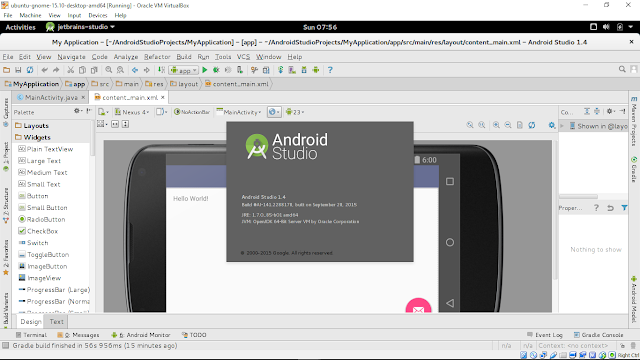
Install Android Studio on 64 bit Ubuntu 15 10 with Ubuntu Make umake

Ubuntu Make is a command line tool which allows you to download the latest version of popular developer tools (include Android Studio) on your installation, installing it longside all the required dependencies (which will only ask for root access if you dont have all the required dependencies installed already), enable multi-arch on your system if you are on a 64 bit machine, integrate it with the Unity launcher… Basically, one command to get your system ready to develop with!


To install Android Studio on Ubuntu:

- Add the Ubuntu Make ppa:
$ sudo add-apt-repository ppa:ubuntu-desktop/ubuntu-make
$ sudo apt-get update

- Install Ubuntu Make:
$ sudo apt-get install ubuntu-make

- Install android-studio:
$ umake android

Once finished, it will also install Java 7 (1.7.0_85 currently) on your system.

This video show how to install Android Studio on 64-bit Ubuntu-GNOME (run on VirtualBox) with Ubuntu Make.


Next:
- Setup Hardware Devices debugging for Android Studio on Ubuntu 15.10

Read More..

Wednesday, March 16, 2016

Mastering Android NDK

Master the skills you need to develop portable, highly-functional Android applications using NDK

Mastering Android NDK

About This Book
  • Develop portable games using Android NDK and debug them on your desktop
  • Familiarise yourself with different popular C++ libraries on Android and use them in your games
  • Write multi-threaded code with graphics, sound, networking, and resource storage
Who This Book Is For
If you want to leverage your C++ skills in mobile development and increase the performance of your Android applications, then this is the book for you. Knowledge of C or C++ is assumed, including pointer manipulation, multi-threading, object-oriented programming concepts, and the basics of C++11. It would be an added advantage if you know how to develop applications without any IDE.

What You Will Learn
  • Explore different popular C++ libraries and import some of them to Android
  • Write portable, multithreaded native code
  • Create applications that play audio with OpenAL
  • Implement gesture recognition in your games and applications
  • Debug mobile applications on your desktop
  • Extract resources from APK archives
  • Render text with FreeType and also use OpenGL ES
In Detail
Android NDK is used for multimedia applications that require direct access to system resources. NDK is also the key for portability, which in turn allows a reasonably comfortable development and debugging process using familiar tools such as GCC and Clang toolchains.

This is a hands-on guide to extending your game development skills with Android NDK. The book takes you through many clear, step-by-step example applications to help you further explore the features of Android NDK and some popular C++ libraries and boost your productivity by debugging the development process.

Through the course of this book, you will learn how to write portable multi-threaded native code, use HTTP networking in C++, play audio files, use OpenGL ES 3, and render high-quality text. Each chapter aims to take you one step closer to building your application. By the end of this book, you will be able to create an engaging, complete gaming application.

Style and approach
This book adopts a step-by-step approach and each chapter is based on the material from the previous ones. The book focuses on putting to your knowledge of C++ use while you develop Android applications of your own.

Read More..

Sunday, February 21, 2016

Android NDK Game Development Cookbook

Android NDK Game Development Cookbook

For C++ developers, this is the book that can swiftly propel you into the potentially profitable world of Android games. The 70+ step-by-step recipes using Android NDK will give you the wide-ranging knowledge you need.

Overview
  • Tips and tricks for developing and debugging mobile games on your desktop
  • Enhance your applications by writing multithreaded code for audio playback, network access, and asynchronous resource loading
  • Enhance your game development skills by using modern OpenGL ES and develop applications without using an IDE
  • Features two ready-to-run Android games
In Detail

Android NDK is used for multimedia applications which require direct access to a systems resources. Android NDK is also the key for portability, which in turn provides a reasonably comfortable development and debugging process using familiar tools such as GCC and Clang toolchains. If your wish to build Android games using this amazing framework, then this book is a must-have.

This book provides you with a number of clear step-by-step recipes which will help you to start developing mobile games with Android NDK and boost your productivity debugging them on your computer. This book will also provide you with new ways of working as well as some useful tips and tricks that will demonstrably increase your development speed and efficiency.

This book will take you through a number of easy-to-follow recipes that will help you to take advantage of the Android NDK as well as some popular C++ libraries. It presents Android application development in C++ and shows you how to create a complete gaming application.

You will learn how to write portable multithreaded C++ code, use HTTP networking, play audio files, use OpenGL ES, to render high-quality text, and how to recognize user gestures on multi-touch devices. If you want to leverage your C++ skills in mobile development and add performance to your Android applications, then this is the book for you.

What you will learn from this book
  • Port popular C++ libraries to Android
  • Write portable multithreaded code
  • Play audio with OpenAL
  • Implement gesture recognition
  • Render text with FreeType
  • Use OpenGL ES to port and abstract APIs from the game code to develop games on a desktop PC
  • Debug mobile applications on your desktop
  • Access Flickr and Picasa web services from C++
  • Extract resources from APK archives
  • Develop Android applications without an IDE
Approach

A systematic guide consisting of over 70 recipes which focus on helping you build portable mobile games and aims to enhance your game development skills with clear instructions.

Who this book is written for

If you are a C++ developer who wants to jump into the world of Android game development and who wants to use the power of existing C++ libraries in your existing Android Java applications, then this book is for you. You need to have basic knowledge of C or C++ including pointer manipulation, multithreading, and object-oriented programming concepts as well as some experience developing applications without using an IDE.

Read More..