Pages

Showing posts with label mastering. Show all posts

Thursday, March 31, 2016

Install Android Studio on 64 bit Ubuntu 15 10 with Ubuntu Make umake

Ubuntu Make is a command line tool which allows you to download the latest version of popular developer tools (include Android Studio) on your installation, installing it longside all the required dependencies (which will only ask for root access if you dont have all the required dependencies installed already), enable multi-arch on your system if you are on a 64 bit machine, integrate it with the Unity launcher… Basically, one command to get your system ready to develop with!
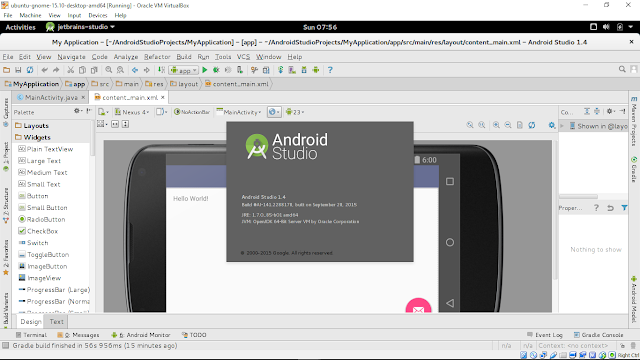

To install Android Studio on Ubuntu:

- Add the Ubuntu Make ppa:
$ sudo add-apt-repository ppa:ubuntu-desktop/ubuntu-make
$ sudo apt-get update

- Install Ubuntu Make:
$ sudo apt-get install ubuntu-make

- Install android-studio:
$ umake android

Once finished, it will also install Java 7 (1.7.0_85 currently) on your system.

This video show how to install Android Studio on 64-bit Ubuntu-GNOME (run on VirtualBox) with Ubuntu Make.


Next:
- Setup Hardware Devices debugging for Android Studio on Ubuntu 15.10

Read More..

Wednesday, March 16, 2016

Mastering Android NDK

Master the skills you need to develop portable, highly-functional Android applications using NDK

Mastering Android NDK

About This Book
  • Develop portable games using Android NDK and debug them on your desktop
  • Familiarise yourself with different popular C++ libraries on Android and use them in your games
  • Write multi-threaded code with graphics, sound, networking, and resource storage
Who This Book Is For
If you want to leverage your C++ skills in mobile development and increase the performance of your Android applications, then this is the book for you. Knowledge of C or C++ is assumed, including pointer manipulation, multi-threading, object-oriented programming concepts, and the basics of C++11. It would be an added advantage if you know how to develop applications without any IDE.

What You Will Learn
  • Explore different popular C++ libraries and import some of them to Android
  • Write portable, multithreaded native code
  • Create applications that play audio with OpenAL
  • Implement gesture recognition in your games and applications
  • Debug mobile applications on your desktop
  • Extract resources from APK archives
  • Render text with FreeType and also use OpenGL ES
In Detail
Android NDK is used for multimedia applications that require direct access to system resources. NDK is also the key for portability, which in turn allows a reasonably comfortable development and debugging process using familiar tools such as GCC and Clang toolchains.

This is a hands-on guide to extending your game development skills with Android NDK. The book takes you through many clear, step-by-step example applications to help you further explore the features of Android NDK and some popular C++ libraries and boost your productivity by debugging the development process.

Through the course of this book, you will learn how to write portable multi-threaded native code, use HTTP networking in C++, play audio files, use OpenGL ES 3, and render high-quality text. Each chapter aims to take you one step closer to building your application. By the end of this book, you will be able to create an engaging, complete gaming application.

Style and approach
This book adopts a step-by-step approach and each chapter is based on the material from the previous ones. The book focuses on putting to your knowledge of C++ use while you develop Android applications of your own.

Read More..