Pages

Showing posts with label work. Show all posts

Wednesday, May 11, 2016

SMS Bomber Android Work 100

SMS Bomber Android (Work 100%)


Software ini cocok untuk anda yang suka iseng ..
tanpa basa basi ,,,,
Yuuk langsung aja di download :-)

Download Juga Anti-Sms Bomber                   

HAHAHAHA Start BOmbing!!!!
Read More..

Monday, May 9, 2016

Put Android to work Attend the first ever Android for Work Live online conference on November 4th


Editors note: Were launching our first Android for Work Live online event to share how Android is transforming the workplace, expanding the business role of mobile devices and helping companies like Guardian Life Insurance Company achieve more with mobility. The event will take place on Wednesday, Nov 4th at 11 am PDT. Register today.

Mobile devices are essential for navigating our personal lives, from buying movie tickets and guiding us to weekend get togethers to helping us take out a home loan. For consumers, it seems that almost anything can be done now using smartphones and tablets. But in business, these devices have only just begun to change the way we work.

When we launched Android for Work earlier this year, we set out to close this gap, by helping companies use Android’s flexibility and choice to make the most of business mobility. Why? Because we see a world where mobility means so much more than mail, calendar and contacts.

This year, more than 10,000 companies are testing or deploying Android for Work, and Frost & Sullivan recently awarded us the 2015 North America Visionary Innovation Award for Mobile Enterprise Productivity. With Android Marshmallow, we’re taking another step in that journey by building out support for deploying Android devices in a host of scenarios – from dedicated employee use to installing customer-facing hardware that makes interactions more dynamic and responsive.


At Android for Work Live, you’ll:

  • Hear from Andrew Toy, product management director for Android for Work, who’ll discuss the broad vision of Android in the workplace and how businesses can mobilize every worker and workflow.
  • Learn how Android’s vast selection of devices – from affordable phones to locked-down hardware and customized devices – creates choice and agility for BYOD, corporate deployments and single-purpose scenarios.
  • Get an in-depth look at how companies can rely on Android’s built-in multi-layered protections to keep business data secure and managed across all devices in an overview from Adrian Ludwig, technical lead for Android security.
  • Hear insights from Android customers, including Guardian Life Insurance Company.

Register for Android for Work Live today and join the conversation on social media using #AndroidforWorkLive15.
Read More..

Sunday, May 8, 2016

Android Studio AVD Manager now support Nexus 6P 5X profile

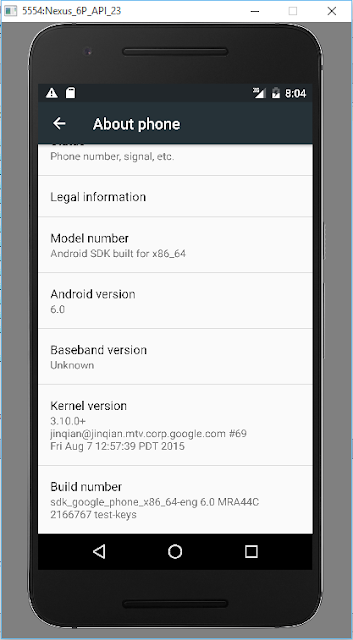
Android Studio AVD Manager now support Nexus 6P/5X profile, you can create AVD (Android Virtual Device) running Android 6, Marshmallow, API 23.


Create AVD of Nexus 6P running Android 6 Marshmallow

Read More..

Saturday, May 7, 2016

Cara Recovery Data di Android Work 100 Berhasil

Cara Recovery Data di Android Work 100 % Berhasil

Cara Recovery Data di Android Work 100 % Sukses - Untuk kamu yang sudah terlanjur menyimpan data penting di Android, namun tanpa disengaja hilang begitu entah itu karena tidak sengaja di format atau hp kamu bootloop atau karena penyebab lain dan kamu tidak bisa melakukan pengembalian data tersebut maka dari itu disini LingkaranAnda akan memberikan tutorial yang paling mudah tanpa harus melakukan format.


Nah, untuk mengembalikan data yang hilang dari sebuah perangkat Android setelah terformat, maka cara yang mudah adalah dengan menggunakan program untuk mengembalikan data. Program ini biasanya ada di komputer desktop dan banyak digunakan. Program seperti Get Data Back, Data Recovery, Pandora Recovery, Test Disk, Foremost, R-Studio, Recuva, dan masih banyak lagi. Program tersebut biasanya bisa diandalkan untuk mengembalikan data yang bahkan sudah terhapus dari Recycle Bin. Memang tidak semuanya, tetapi program tersebut cukup bisa diandalkan untuk mengembalikan data. Termasuk untuk mengembalikan data di MicroSD yang tertancap dalam perangkat Android Anda.


Untuk memulihkan data yang terformat pada memori internal sebenarnya masih bisa menggunakan program-program tersebut. Sayangnya, program tersebut kurang maksimal untuk pemulihan data di Android. Untuk memulihkan data atau Restore data di Android, sebaiknya gunakan program yang bernama Android Data Recovery. Program yang satu ini memiliki kelebihan dalam mengembalikan data yang terformat di Android. Tetapi penggunaan program ini pun sama seperti program lainnya, yakni harus diinstal di komputer desktop.


Hal yang Perlu Diperhatikan Sebelum Melakukan Restore Data
Untuk melakukan Restore data di Android menggunakan Android Data Recovery, sebaiknya Anda terlebih dahulu melakukan hal-hal berikut ini. Hal-hal berikut ini cukup penting untuk diperhatikan oleh Anda dalam langka proses Restore data dengan menggunakan Android Data Recovery. Apa saja hal-hal yang dimaksud? Berikut penjelasannya.
  • Proses pencarian data sebaiknya harus disegerakan setelah data tersebut terhapus atau terformat.
  • Untuk memaksimalkan pemulihan atau Restore, sebaiknya jangan menyimpan data baru. Proses penyimpanan data baru bisa saja menimpa data yang terhapus tersebut.
  • Jangan ada data dengan nama yang sama dengan nama data yang dihapus
  • Proses Restore data menggunakan Android Data Recovery umumnya bisa kembali normal. Bahkan banyak data yang kembali dengan utuh dari kerusakan sebelum terhapus tetapi kemungkinan potensi data tidak bisa diselamatkan pun masih terbuka.

Cara Restore Data dengan Android Data Recovery.

Setelah memperhatikan hal-hal tersebut, maka proses Restore data bisa Anda mulai dengan terlebih dahulu mengunduh program Android Data Recovery. Anda bisa mengunduh program dengan mengakses situs androiddata-Recovery.com. Unduhlah program yang gratis tetapi jika Anda memiliki dana lebih, tidak ada salahnya Anda mencoba menggunakanprogram Android Data Recovery versi berbayar. Setelah Anda selesai mengunduh, perhatikan langkah berikut ini :
  • Anda bisa langsung menginstal program Android Data Recovery di komputer.
  • Hubungkan perangkat Android yang Anda miliki dengan komputer yang sudah terinstal Android Data Recovery. Cara menghubungkannya, Anda cukup menggunakan kabel USB.
  • Setelah terhubung, bukalah program Android Data Recovery dan lakukan pemindaian atau Scaning pada perangkat Android
  • Setelah proses pemindaian selesai, selanjutnya lakukan Recovery pada tampilan bentuk data yang sudah terpindai. Anda bisa melakukan Recovery data dengan cara mengklik data tersebut.
  • Setelah proses klik Recovery, maka data hilang Anda kini sudah kembali. Data tersebut kemungkinan besar cenderung tidak kehilangan kualitasnya.
  • Setelah dilakukan Recovery, maka data yang sudah Restore, sebaiknya disimpan pada folder tertentu di perangkat Android milik ..

Demikian Tips kali ini Cara Recovery Data di Android Work 100 % Berhasil, semoga dapat bermanfaat.
Read More..

Friday, April 29, 2016

Android Selection Controls

Android offers selection Controls like


1. List View.

2. Spinner

3. Check box

4. Radio Button

The List View:


ListView represents a list of items that can be selected. It is similar to the ListBox in C#.
<?xml version="1.0" encoding="utf-8"?>
<LinearLayout
android_orientation="vertical"
android_layout_width="fill_parent"
android_layout_height="fill_parent"
>
<TextView
android_layout_width="fill_parent"
android_layout_height="wrap_content"
android_id="@+id/txt"
/>
<ListView
android_layout_width="wrap_content"
android_layout_height="wrap_content"
android_id="@+id/List"
/>
</LinearLayout>


To populate the list and handle the ItemClick event we can do it like this :
final String [] items=new String[]{"Item1","Item2","Item3","Item4"};
ArrayAdapter ad=new ArrayAdapter(this,android.R.layout.simple_list_item_1,items);
list=(ListView)findViewById(R.id.List);
list.setAdapter(ad);
list.setOnItemClickListener(new OnItemClickListener()
{

public void onItemClick(AdapterView arg0, View arg1, int arg2,
long arg3) {
// TODO Auto-generated method stub
TextView txt=(TextView)findViewById(R.id.txt);
txt.setText(list.getItemAtPosition(arg2).toString());


}

}
);

The above code displays the selected item text in the textview:
The parameters of the OnItemClick method are:


Arg0:the listview, notice that it is of type AdapterView.

Arg1: the view that represents the selected item, in this example it will be a TextView

Arg2: the position of the selected item.

Arg3: the id of the selected item.

When creating the adapter you can specify the layout of the list by using simple_list_item_1 to display a simple list or by using


simple_list_item_single_choice to display radio buttons for single selection

Or by using simple_list_item_multiple_choice to display check boxes for multiple selection
You can set the choice mode of the list by using setchoicemode() method:
public void onCreate(Bundle savedInstanceState) {
super.onCreate(savedInstanceState);
//setContentView(R.layout.main);
final String [] items=new String[]{"Item1","Item2","Item3","Item4"};
ArrayAdapter ad=new ArrayAdapter(this,android.R.layout.simple_list_item_multiple_choice,items);
setListAdapter(ad);
ListView list=getListView();
list.setChoiceMode(ListView.CHOICE_MODE_MULTIPLE);

}

Now suppose you want to change the text of the an item when it is clicked, you can do it like this:
list.setOnItemClickListener(new OnItemClickListener()
{

public void onItemClick(AdapterView arg0, View arg1, int arg2,
long arg3) {
// TODO Auto-generated method stub
TextView txt=(TextView)findViewById(R.id.txt);
items[arg2]="changed";
list.setAdapter(new ArrayAdapter(ListControls.this,android.R.layout.simple_list_item_1,items));

}

}
);

Or a more neat way:
list.setOnItemClickListener(new OnItemClickListener()
{

public void onItemClick(AdapterView arg0, View arg1, int arg2,
long arg3) {
// TODO Auto-generated method stub
TextView temp=(TextView)arg1;
temp.setText("changed 2");
}

}
);

See that you actually change the value of the string array item at the selected position then bind the listview with the adapter again. Or you capture the View object and do what you want.


If the activity will contain just one listview you can create an activity that extends list view. In this case you don’t have to specify a layout as a listview will fill the screen.
public void onCreate(Bundle savedInstanceState) {
super.onCreate(savedInstanceState);
final String [] items=new String[]{"Item1","Item2","Item3","Item4"};
ArrayAdapter ad=new ArrayAdapter(this,android.R.layout.simple_list_item_1,items);
setListAdapter(ad);


If you want to reference or customize this listview then you can define it in the layouts xml fine by assigning it the id “android:id/list” so that the activity knows which listView is the main list for the activity .

This example shows a listview and a textview
<?xml version="1.0" encoding="utf-8"?>
<LinearLayout
android_orientation="vertical"
android_layout_width="fill_parent"
android_layout_height="fill_parent"
>
<TextView
android_layout_width="fill_parent"
android_layout_height="wrap_content"
android_id="@+id/txt"
android_text="List View Demo"
/>

<ListView
android_layout_width="fill_parent"
android_layout_height="wrap_content"
android_id="@android:id/list"
/>
</LinearLayout>


Now if you want to customize the ui of each row of the listview you define two layouts files: the first has the layout of the activity and the other has layout of each row in the listview
Read More..

Friday, April 1, 2016

Android for Work welcomes new friends


Editors note: To gain access to the latest Android for Work news and updates, join our mailing list. 

Android for Work launched earlier this year to help companies put the world’s most popular mobile OS to work for them. The response has been overwhelmingly positive: today, more than 10,000 businesses, including the World Bank, the U.S. Army and Guardian Life Insurance Company are testing, deploying or using Android for Work.

The Android for Work program took off with the help of our partners across the Android ecosystem, and today we’re expanding the family to 40 companies to continue the momentum, including new device manufacturers, application makers and management providers.
And for the first time, mobile carriers are joining the Android for Work program. AT&T, Verizon, T-Mobile, Sprint, Rogers, Bell Canada, Telus Mobility and KT are now offering broad support for Android for Work, so people can soon turn to their mobile operators to take advantage of Android for Work’s integrated security, management and productivity solutions.

The Android for Work program is also showcasing devices built for regulated industries, like government and healthcare, which have strict security and compliance requirements. Samsung, for example, offers some of the highest levels of government certification with its KNOX devices, while Blackphone by Silent Circle has built enhanced privacy and security features on top of the Android platform. You can check out our regulated devices page here to learn more about Samsung KNOX devices and Blackphone.

All of this investment is designed to help businesses extend the power of mobility in more ways across more teams. And companies are indeed turning to Android for Work to drive that change: SAP uses Android for Work to streamline app distribution and expand support to many more Android devices, Woolworths is looking to standardize on Android for corporate devices, and Guardian Life Insurance Company deployed Android for Work to enable its employees and field agents to work from anywhere on their personal devices. "Choice is important,” says Daniel Johnson, Chief Technology Officer at Guardian Life. “With Android for Work were able to offer Android as a BYOD option in a more secure and manageable way."

With its choice, flexibility and security, we believe Android is uniquely equipped to help businesses tap the full power of mobility. Together with our partners, we’re gearing up to make this a reality.

Learn more by visiting google.com/work/android.
Read More..

Thursday, March 24, 2016

Transforming the way we work with Android for Work


Editors Note: Android for Work Live airs today at 11AM PST. Register here.

The Internet, like previous transformational technologies, emerged as a new and distinct tool before becoming business as usual.

Mobile at work is going through a similar transition, with organizations now interweaving the next generation of mobile productivity into the lives of every employee and through every workflow.

Android for Work: a shared vision for business mobility

We launched Android for Work earlier this year to help businesses put Android’s choice and flexibility to work for them. More than a “packaged” product, Android for Work is a dynamic, expanding ecosystem of more than 80 partners with a shared vision for transforming business.

Android for Work expands on the platform’s multi-layered security, capabilities and APIs, and provides powerful ways for manufacturers, developers, mobility managers and carriers to create the next generation of solutions for work, beyond basic email and productivity.

Marshmallow: BYOD and single use

After enabling “bring your own device” (BYOD) use cases and streamlining application deployment in Lollipop, we’ve taken the next step to improve enterprise mobility in Marshmallow. Workers now enjoy an enhanced BYOD experience with work status notifications and contacts integration. Administrators can simplify certificates, seamlessly set up new accounts, apply more granular permissions and provision new users using NFC.

New work APIs in Marshmallow also enable easy deployment and management of devices in dedicated single-use scenarios, such as defined tasks, kiosks and ATMs.

Going deep on security

Android for Work builds upon the expanded security features such as runtime permissions, verified boot, hardware-isolated security, SELinux, application sandboxing and protections within Google Play Services.

By going deep on security, it made sense that most security-conscious companies such as BlackBerry are collaborating with us to support Android for Work. Additionally, following the announcement of its first Android device, PRIV, BlackBerry announced their support for monthly scheduled updates, matching the Android patch schedule. You can find details of their announcement here.

Together along with Nexus, Samsung and Blackphone by Silent Circle, patching is predictable and responsive.

The freedom to choose

Businesses are responding to Android’s choice and flexibility, enjoying the range of price points and form factors – from the ultra stylish to the ultra rugged. They’re also deploying an array of business apps and building their own custom solutions on the open framework.

More than 19,000 organizations are already testing, deploying or using Android for Work. During Android for Work Live, we’ll showcase how new customers including Guardian Life Insurance deploys Android for BYOD; Peninsula Hotels provides guests with Android tablets for room controls, information and service; and Safelite repair technicians use Samsung devices for communication, scanning, navigation, payment and training.

Android for Work Pilot Program for select EMM partners

For up to 3000 companies, who set up Android for Work with a participating EMM in their production network, between now and December 31, 2015, we’ll be providing a Nexus 5X. Learn more.
Read More..

Thursday, March 10, 2016

Introduction to UI in Android

Layouts in android is constructed from two objects: View and ViewGroup.


The View class is the base class for many widgets sub classes such as TextView and Button classes.

The ViewGroup is a view that conatains other views. The Viewgroup class is the base class for many layouts in android.

The UI Hierarchy is described in this picture from the android online sdk documentation


As you can see the root node is a view group which can be any layout that contains child views or even other viewgroups.


The root node appears on the activity by calling setcontentview ( method). Which in turn draws its child nodes and each child node draws its child nodes

In the following posts we are going to explore the categories of android widgets which are:
 
1. Text Controls


2. Button controls

3. List controls

4. Grid controls

5. Date and time controls

6. Menus

7. Dialogs

8. Adapters
Read More..

Wednesday, February 17, 2016

Android is ready for work


(Cross-posted on the Android Blog.)

Over a billion people today carry Android smartphones—devices that are more powerful than the computers we used just a few years ago.

For many, these phones have become essential tools to help us complete important work tasks like checking email, editing documents, reviewing sales pipelines and approving deals. But for the majority of workers, smartphones and tablets are underutilized in the workplace. Their business and innovation potential remain largely untapped.

Today were announcing the Android for Work program to tap into that potential. With a group of partners, were helping businesses bring more devices to work by securing, managing and innovating on the Android platform.

Android for Work features four key technology components:

  • Work profiles – We’ve built on the default encryption, enhanced SELinux security enforcement and multi-user support in Android 5.0, Lollipop to create a dedicated work profile that isolates and protects work data. IT can deploy approved work apps right alongside their users personal apps knowing their sensitive data remains secured. People can use their personal apps knowing their employer only manages work data and won’t erase or view their personal content.
  • Android for Work app – For devices running Ice Cream Sandwich through Kitkat, or that don’t run work profiles natively, we’ve created the Android for Work app. The app, which delivers secure mail, calendar, contacts, documents, browsing and access to approved work apps, can be completely managed by IT.
  • Google Play for Work – Google Play for Work allows businesses to securely deploy and manage apps across all users running Android for Work, simplifying the process of distributing apps to employees and ensuring that IT approves every deployed app.
  • Built-in productivity tools – For everyday business tasks, we’ve created a suite of business apps for email, contacts and calendar, which supports both Exchange and Notes and provides document editing capabilities for documents, spreadsheets and presentations.
We’re joined by a number of partners as part of the Android for Work program, including many familiar names within the Android ecosystem:
Our partners bring IT:

  • Consistent management – Enterprise mobility management (EMM) providers integrate with standardized management APIs to create a simple way to manage all Android devices, new and old, from one dashboard. All Android for Work capabilities are delivered through EMM partners, with more providers available soon.
  • Secure business apps – Software vendors and developers can create a single version of any Google Play app that can be securely deployed to any Android device without alterations or wrapping. And they can create standard management configurations that allow IT to apply policies per app.
  • Innovative devices – Android smartphone and tablet makers are a key part of the Android for Work program, as they create devices and experiences that add additional value for customers.

Together with a wide range of management, application and device makers, we believe the Android for Work program provides businesses and workers with the choice and flexibility they need to get things done at work.

Learn more by visiting google.com/work/android.


Read More..