Showing posts with label untuk. Show all posts
Showing posts with label untuk. Show all posts
Thursday, May 12, 2016

Tuesday, April 26, 2016
Call Of ModernWar Warfare Duty Mod Money Android Game Moded

Salam Blogger :)
Di waktu yg senggang ini, abis saur ya kan trus ga bsa tidur lagi, yaudh mending share game android dulu deh. hehe. Oke deh, deskripsi singkatnya. game ini, dimna kita menjadi pilot dalam perang pesawat tempur. kita bsa me manuver kan pesawat kita sambil menyerang musuh. disini juga banyak pilihan pesawatnya. dan setiap pesawat punya kemampuan dan amunisi yg berbeda2. oke langsung aja cek it dot :)
Details Game:
Name : Call Of ModernWar:Warfare Duty
Genre : Action,Simulation
Platform : Android
Requires : Android 4.0 and up
Modification on Game:
- MOD Money
Review Modif:

Screenshoot:


Tutorial Instal :
1. Download game.
2. Pindahkan Game ke Androidmu.
3. Uniinstal Version originalnya, jika ada.
4. Instal MOD apk & Play
5. Enjoyyy
|DOWNLOAD|
Call Of ModernWar:Warfare Duty- Mod Money[Android Game : Moded]
|Download Original game|
On Playstore
#Salam Blogger
#Semoga bermanfaat :)
#Ask? comment :)
Monday, April 25, 2016
Sunday, April 24, 2016
3 Aplikasi Terbaru Untuk Melacak Hp Android Hilang
3 Aplikasi Terbaru Untuk Melacak Hp Android Hilang

Seocips.com. Pastinya anda sudah tahu dan tidak asing lagi dengan platform milik android ini yaitu Android. Platform android ini merupakan salah satu platform terpopuler, apalagi bagi pengguna gadget seperti smartphone. Mulai dari anak-anak hingga orang dewasa, semuanya menggunakan dan memanfaatkan Android dalam kehidupan sehari-hari.
Untuk anda pengguna android pastinya tidak ingin jika android anda hilang maka untuk berjaga-jaga sebaiknya melindungi smartphone android anda dengan aplikasi-aplikasi untuk melacak android yang hilang yang banyak tersedia di Google Play. Berikut ini seocips.com akan membagikan 3 aplikasi yang dapat anda gunakan apabila satu saat nanti hal yang tidak anda inginkan yaitu android anda hilang.
Gunakan aplikasi "Wheres My Droid"
Untuk yang pertama anda dapat encoba menggunakan aplikasi ini. Ketika anda mengintal aplikasi ini anda dapat mengisinya dengan pasword, kemudian nomor telepon yang nantinya akan dihubungi jika nantinya SIM card yang anda pasang di Hp anda di ganti oleh orang lain. Masih banyak lagi fungsinya dan untuk lebih jelasanya anda dapat mencoba mengistal aplikasi ini di smartphone android anda.
Mobile tracker for Android
Cara kerja aplikasi ini hampir sama dengan aplikasi yang pertama tadi yaitu aplikasi android "Wheres My Droid" Saat Android Anda hilang dan ditemukan oleh orang lain, kemudian Android Anda diberi sim card baru maka akan secara otomatis memberi pemberitahuan melalui sms. Sms ini akan menuju sesuai kontak yang Anda isikan ketika anda pertamakali menginstal aplikasi ini di android anda. Anda dapat mencoba aplikasi ini.
Android lost
Aplikasi Andorid Lost ini memiliki fungsi yang lebih banyaj dari aplikasi-aplikasi sebelumnua dimana anda dapat melihat lokasi smartphone android anda. jadi misalnya android anda hilang dicuri maka anda dapat melihat lokasi dimana android anda berada, sepertinya aplikasi ini menggunakan fiture Gps. Pada dasarnya, Anda dapat mengontrol Android Anda dari jarak jauh, mempasword android anda sehingga data-data akan aman.
Ada baiknya jika anda tidak perlu melacak android anda, nah agat tidak perlu dilacak tentusaja anda harus menjaganya agar tidak samapi hilang. Masih banyak aplikasi-aplikasi yang dapat anda gunakan untuk melacak aplikasi android anda jika hilang dan akan kami bahas di lain waktu nanti. Sekian informasi android kali ini dan semoga dapat membantu.
Tuesday, April 19, 2016
Beginilah Cara Membuat Aplikasi Web Blog Untuk Android
Seocips - Cara Membuat Aplikasi Web/Blog Untuk Android - Cara membuat aplikasi Android untuk blog. Saat ini sudah banyak diciptakan beberapa tools yang dapat mengerjakan dalam pembuatan aplikasi-aplikasi android tanpa harus menguasai bahasa program android terlebih dahulu karena tools-tools tersebut berbasis interface yang tentunya dapat digunakan oleh seorang pemula sekalipun untuk membuat aplikasi-aplikasi android sesuai dengan keinginanannya sendiri,
Android memiliki prospek yang sangat bagus. Tentunya hal ini sangat tepat bila kita saat ini ingin memulai untuk belajar membuat aplikasi android. Untuk bisa menguasai cara membuat aplikasi android ini sangat mudah karena saat ini telah banyak sumber refferensi tulisan yang mengajarkan kepada kita tentang bagaimana cara membuat aplikasi android yang mudah.

Pada kesempatan ini juga seocips akan membagikan mengenai bagaimana cara membuat aplikasi android, tapi dikhusukan untuk website atau Blog. Jadi disini untuk anda yang ingin websitenya memiliki aplikasi sendiri maka dapat mencoba membuatnya dan menyebar luaskan aplikasi anda. Yang tentusaja untuk menambah populer website atau blog anda.
1. Silahkan masuk ke situsnya Appsgeyser,
2. Setelah anda masuk silahkan klik "Create Now",
3. Kemudian Pilih Website atau cari jika di browser anda tampilannya berbeda silahkan cari saja "Website",

4. Isi kolom yang tersedia. Contohnya seperti pada gambar berikut ini;

5. Setelah pengisian data web/blog anda pada AppGeyser selesai, kemudian klik Create App
6. Langkah selanjutnya kolom pengisian data, silahkan isi first name, last name, email, pasword dan kemudian klik Sign Up.
7. Untuk mendownlod file apk nya, Anda hanya tinggal mengklik tombol download maka secara otomatis file apk langsung terdownload.

8. Setelah Aplikasinya di download maka sekarang anda dapat mencoba dengan cara menginstalnya di Aplikasi android anda.
Read More..
Android memiliki prospek yang sangat bagus. Tentunya hal ini sangat tepat bila kita saat ini ingin memulai untuk belajar membuat aplikasi android. Untuk bisa menguasai cara membuat aplikasi android ini sangat mudah karena saat ini telah banyak sumber refferensi tulisan yang mengajarkan kepada kita tentang bagaimana cara membuat aplikasi android yang mudah.
Pada kesempatan ini juga seocips akan membagikan mengenai bagaimana cara membuat aplikasi android, tapi dikhusukan untuk website atau Blog. Jadi disini untuk anda yang ingin websitenya memiliki aplikasi sendiri maka dapat mencoba membuatnya dan menyebar luaskan aplikasi anda. Yang tentusaja untuk menambah populer website atau blog anda.
1. Silahkan masuk ke situsnya Appsgeyser,
2. Setelah anda masuk silahkan klik "Create Now",
3. Kemudian Pilih Website atau cari jika di browser anda tampilannya berbeda silahkan cari saja "Website",
4. Isi kolom yang tersedia. Contohnya seperti pada gambar berikut ini;
5. Setelah pengisian data web/blog anda pada AppGeyser selesai, kemudian klik Create App
6. Langkah selanjutnya kolom pengisian data, silahkan isi first name, last name, email, pasword dan kemudian klik Sign Up.
7. Untuk mendownlod file apk nya, Anda hanya tinggal mengklik tombol download maka secara otomatis file apk langsung terdownload.
8. Setelah Aplikasinya di download maka sekarang anda dapat mencoba dengan cara menginstalnya di Aplikasi android anda.
Sunday, April 3, 2016
Soldier vs Aliens Unlock Item Mod Credits Android Game Moded

Salam Blogger :)
Ngantuk... ,tapi mau update dulu sblm tidur. oh iya blm sempet update game2 request. byk gawean. mungkin abis lebaran baru bs. Oke bahas game ini dulu bentar, game ini game berbentuk action dmna kita menjadi prajurit yg melawan alien2 jahat. butuh waktu lama klo ga pake mod membeli senjata2 dan baju2 perang yg bagus. tp karena ini sudah di MOD. semua senjata sudah lengkat, dan baju perang pun sudah yg paling bagus. hehe. tinggal kalian liat endingnya gmna, oke cek it...
Details Game:
Name : Soldier vs Aliens
Genre : Action,Casual
Platform : Android
Requires : Android 4.0 and up
Modification on Game:
- MOD Credits
- Unlock All Item
Review Modif:

Screenshoot:


Tutorial Instal :
1. Download game.
2. Pindahkan Game ke Androidmu.
3. Uniinstal Version originalnya, jika ada.
4. Instal MOD apk & Play
5. Enjoyyy
|DOWNLOAD|
Soldier vs Aliens - Unlock Item&Mod Credits[Android Game : Moded]
|Download Original game|
On Playstore
#Salam Blogger
#Semoga bermanfaat :)
#Ask? comment :)
Friday, April 1, 2016
Angry Birds Stella Mod Money Android Game Moded
.png)
Salam Blogger :)
Sibuk dan sibuk itulah judul harian ku. huftt... mumpung lagi suntuk dan ga mau ngapain. lahir lah sebuah postingan ini hehe. udah lama juga ga update. game ini game android yg sudah di mod. nama game nya Angry birds Stella . Permainannya sama seperti angry bird seperti biasa cmn karakternya saja yg berbeda. oke langsung aja cek it.
Details Game:
Name : Angry Birds StellaGenre : Action
Platform : Android
Requires : Android 2.3.3 and up
Modification on Game:
- MOD Money 9999999
Review Modif:

Screenshoot:


Tutorial Instal :
1. Download game.
2. Pindahkan Game ke Androidmu.
3. Uniinstal Version originalnya, jika ada.
4. Instal MOD apk & Play
5. Enjoyyy
|DOWNLOAD|
Angry Birds Stella - Mod Money[Android Game : Moded]
|Download Original game|
On playstore
Angry Birds Stella - Mod Money[Android Game : Moded]
|Download Original game|
On playstore
#Salam Blogger
#Semoga bermanfaat :)
#Ask? comment :)
Saturday, March 26, 2016
Aplikasi Untuk Pengguna Smartphone Android yang Wajib Dimiliki
 Aplikasi Untuk Pengguna Smartphone Android yang Wajib Dimiliki - Ketika anda baru mempunyai Hp smartphone berbasis OS Android, apa yang anda pikirkan untuk membuat ponsel anda terlihat menarik dan berguna agar tidak terlalu membosankan dalam menggunakan ponsel tersebut. Biasanya yang di pikirkan adalah Aplikasi.
 Nah,di sore hari ini saya akan berbagi tentang Aplikasi Untuk Pengguna Smartphone Android yang Wajib Dimiliki. Semua Aplikasi ini tersedia Di Play Store tersedia misalnya seperti Aplikasi yang dapat mempercantik tampilan seperti Launcher, tidak hanya itu di Google Playstore juga banyak Aplikasi Game, Anti virus, dan masih banyak lagi, tetapi ada beberapa Aplikasi pilihan Lingkaran Anda yang mampu membuat tampilan android anda menjadi lebih menarik dan juga Aplikasi yang sangat berguna untuk keseharian anda.
Bukan hanya di Playstore, banyak Aplikasi di luar Playstore yang mampu lebih bagus dari yang ada di Playstore, biasanya Aplikasi tersebut membutuhkan Akses Root. Langsung saja simak ulasan tentang:
Aplikasi Untuk Pengguna Smartphone Android yang Wajib Dimiliki :
File Manager
Aplikasi ini fungsinya untuk mengatur memori internal dan eksternal (SD Card) atau dengan kata lain dengan File Manager kamu dapat mengelola atau sekedar melihat file yang kamu miliki, pada computer atau laptop lazim disebut Windows Explorer, fungsinya ya seperti itu kurang lebih sama. Beberapa Aplikasi Penting untuk Android berupa File Manager yang terbaik adalah ES File Explorer & Manager, Astro File Manager untuk Android yang belum diroot sementara itu jika kamu sudah me-root Android kalian maka install aplikasi Root Explorer.
Anti Virus
Mengingat Android adalah platform Open Source maka sangat rentan terhadap serangan virus sehingga smartphone kalian tidak selamanya aman untuk menyimpan data dan informasi penting lainnya yang bersifat pribadi, untuk itu diperlukan aplikasi anti virus yang mumpuni karena bisa saja virus menyamar sebagai aplikasi yang kamu install sehingga dapat membahayakan perangkat yang kalian miliki. Berikut adalah Aplikasi Penting untuk Android dalam bentuk antivirus yang dapat kamu install: Lookout, Avast atau AVG. Pastikan kamu memberli versi berbayar / dengan lisensi agar smartphone kalian terproteksi dengan baik.
Browser
Biasanya smartphone atau gadget Android pada umumnya telah dilengkapi browser bawaan, namun adakalanya kalian bosan dnegan browser default maka bisa mencoba alternative lain seperti Opera Mini, UC Browser, ataupun Firefox.
Social Media
Jaman sekarang sehari saja tidak membuka akun jejaring social rasanya ada yang kurang, untuk itu kamu bisa menginstall aplikasi wajib di Android seperti social messenger berikut ini: Facebook, Twitter, Instagram, WhatsApp, Line, Kakaotalk, WeChat atau BBM Android. terlebih lagi sekarang banyak Aplikasi BBM Mod atau BBM yang sudah di Modifikasi.
Launcher
Launcher adalah sebuah Aplikasi yang dapat merubah tampilan Android anda menjadi lebih menarik, dan di Playstore terdapat banyak Launcher seperti launcher Anole Mobile Windows yang mampu merubah tampilan Android anda seperti tampilan komputer.
Aplikasi Berbagi
Aplikasi berbagi sangat di perlukan untuk anda yang suka berbagi Aplikasi, atau pun file lain, mungkin memang sudah ada bluetooth namun, dengan Aplikasi berbagi ini akan memberikan anda kecepatan dalam melakukan transfer File ataupun Aplikasi seperti SHAREit dan ShareCloud.
Kamera dan Multimedia Player
Jika kamu bosan dengan aplikasi bawaan Android yang biasanya sangat minim, maka silahkan mencoba aplikasi wajib di Android keren ini : Camera360, MomentCam, Fisheye Pro untuk memaksimaklan kinerja kamera dan fotografi. Coba juga aplikasi MX Player dan VLC untuk memutar video kesayangan.
Games
Bermain game merupakan salah satu hobi yang khas bagi pengguna smartphone Android, apalagi Google Play menyediakan ribuan game keren baik versi gratisan maupun berbayar, tentunya game berbayar menyediakan fitur lebih bagus dibanding versi gratisan, namun ada beberapa game gratisan dengan fitur lengkap.
Bagaimana ? Apa anda sudah mendapatkan referensi yang anda cari untuk mendapatkan Aplikasi Terbaik Yang Ada di Playstore, itulah beberapa Aplikasi rekomendasi dari saya sesuai kategori yang di butuhkan.
Sekian dari saya tentang Aplikasi Untuk Pengguna Smartphone Android yang Wajib Dimiliki, semoga bermanfaat.
Wednesday, March 23, 2016
Tuesday, March 22, 2016
Monday, March 21, 2016
Introduction to Android
Android is a platform for developing mobile application that supports most of the java standard edition (J2SE) except for Abstract Windows Toolkit (AWT) and Swing so if you are a java developer you won’t feel strange when developing for android.
In this post we’re going to demonstrate some of the features of the Android platform so that any developer from any background can have a look on what Android really is .
This picture describes the Android software stack that can be described briefly as a Linux Kernel and C/C++ libraries exposed through an application framework that provides services for and management of runtime and applications.

The elements of the Android software stack are:
Android architecture encourages component reuse allowing you to publish and share activities, services and data between applications with security restrictions defined by you. This enables developers to present new UI for out of the box components such as the phone dialer or contact manager, or adding new functionalities to them.
The basis of the Android applications are:
Read More..
In this post we’re going to demonstrate some of the features of the Android platform so that any developer from any background can have a look on what Android really is .
- Java code is interpreted not compiled (see this link to know the difference) and it need the Java Virtual Machine JVM to do so. Android provides its own virtual machine called the Dalvik Virtual machine
- The dalvik VM takes the generated java class files and combine them in to Dalvik executable (.dex) files that saves storage space (uncompressed) by half compared to similar JAR file.
- Google did not use a Just In Time (JIT) debugger because of the fact that many of android’s core libraries and APIs are written in C and C++ such as the graphics API.
- The final executable code of Android is not java byte code it is .dex files.
This picture describes the Android software stack that can be described briefly as a Linux Kernel and C/C++ libraries exposed through an application framework that provides services for and management of runtime and applications.
The elements of the Android software stack are:
- Linux Kernel: version 2.6, provides abstraction between the hardware and the rest of the stack, responsible for device drivers (Camera , Wi Fi, etc…), resources management , power management, security and net working
- C/C++ Libraries: such as SQL lite, Graphics libraries such as OpenGL, media library for Audio and Vide playback
- The Android Runtime: includes Core libraries and the Dalvik VM.
The Core libraries provide most of java libraries + additional Android libraries.
The Dalvik VM is optimized to run multiple instances of VMs. As Java applications access the core libraries each application has it’s own VM - The Android Application Framework: Provides classes required to develop an Android application and abstraction between hardware access. the Android Java API’s main library include telephony, content providers (data), resources, locations and UI.
- Application Layer: all Android applications(native or third party) are built on the application layer using the same API.
Android architecture encourages component reuse allowing you to publish and share activities, services and data between applications with security restrictions defined by you. This enables developers to present new UI for out of the box components such as the phone dialer or contact manager, or adding new functionalities to them.
The basis of the Android applications are:
- Activity Manager: which controls the life cycle of the activities, activities can be compared to the windows or web forms they carry the controls (views) that construct the interface, an activity represents a single screen.
- Views: the UI components that construct the interface. They can be compared to the swing or windows forms controls
- Notification Manger: provides a consistent mechanism to notify or alert users.
- Content Providers: lets applications to share data between them.
- Resources Manager: much like the ASP.NET resources concept. Enables the developer to store resources such as strings or images
Tuesday, March 8, 2016
Game Shadowgun THD v1 0 1 Modded untuk semua Android
Persyaratan minimum: Android 2.2+

Pada tahun 2350 salah satu korporat korup menguasai intergalaksi. Mereka banyak menyewa pemburu bayaran untuk tujuan taruhan. Yang terbaik di antara mereka dijuluki sebagai SHADOWGUNS.
Download:
APK: filesonic | uploading (6.68 MB)
SD data: filesonic | uploaded (248.77 MB)
Read More..
Download:
APK: filesonic | uploading (6.68 MB)
SD data: filesonic | uploaded (248.77 MB)
Monday, February 29, 2016
Kumpulan Game PS1 untuk All Android Devices
Baiklah berikut Game-game yang ane punya..
1. TEAM BUDDIES
pass : Code:04
2. BEYBLADE
size only 4mb
PASS : http://snesorama.us/
3. DragonBall GT - Final Bout
size 50 mb an..
4. Twisted Metal 3
Only 7mb di extract jadi 250mb
5. SmackDown
6. Tomba
Size 7mb >>extract 400 mb
7. Digimon Rumble Arena
8. Final Fantasy Tactic
9. Resident Evil Survivor
Favorit gue untuk ngadu nyali
10. Scooby-doo
11. Driver
Lumayan buat ngebut2an
12. Dino Crisis 2
Game yang buat jantung mau copot
13. Tomba 2
14. Need for Speed 2
15. Medal of Honor
16. Die Hard Trilogy
17. Tony Hawk Pro Skater 4
Pertama ekstrak dulu game yang sudah didownload ,,
Game yang berformat .bin ,contoh (Resident evil survivor.bin) bisa langsung dimainin pake Fpse
Game yang berformat .bin ,contoh (Resident evil survivor.bin) bisa langsung dimainin pake Fpse
nb : Di dalam file game yang sobat download ada beberapa game yang berformat .bin.data & .bin.mode untuk ngeekstrak nya menjadi .bin harus pakai COSI.exe, yang belum punya
Download COSI disini .(link fixed)
Download COSI disini .(link fixed)
Cara menggunakan cosi sangat mudah, pertama buka COSI di pc/laptop, cari file game hasil extract yang didownload tadi (file extensionnya … .bin.data & … .bin.mode) pilih decompress, tunggu sampai selesai….
Beberapa game yg saya share juga ada yg extensionnya .ecm
Untuk menjadikannya image file agar bisa dimainin pake aplikasi UnECM.
cara pakai file ….ecm di drag ke apps unecm ( dijadikan 1 folder ).
Download UnECM
Kalau ada link yang rusak/mati harap lapor saya..
Sunday, February 28, 2016
Mi Luncher dan Launcher Buzz Untuk Android Versi Terbaru dan Gratis
Download Install Mi Luncher dan Launcher Buzz Untuk Android Versi Terbaru dan Gratis – Siapa yang tidak mau jika tampilan homescreen di android terlihat mernarik dan berbeda dari kebanyakn pengguna android ?? Nah, disini saya akan memberikan kumpulan launcher android apk terbaru 2016 dan keren serta sangat recomend banget deh untuk di install di hp android kamu.
Bagiamana tidak bagus , karena launcher yang lingkaran anda share adalah launcher yang paling diminati oleh para pengguna android. Lalu Launcher apa saja yang akan saya share untuk kalian semua ?? Untuk itu mari kita lihat ulasannya berikut ini.

- Add My Tab in app drawer.
- Add floating menu feature.
- Add app drawer and folder background blurring effect.
- Minor bug fixed.
Buzz Launcher Versi 1.9.0.10 apk - DOWNLOAD
Miui Launcher apk - DOWNLOAD
Demikian artikel kali ini tentang Mi Luncher dan Launcher Buzz Untuk Android Versi Terbaru dan Gratis, semoga bermanfaat.
Sunday, February 21, 2016
Lord Of Legion Infinite Wall HP VIP Unlocked Android Game Moded

Salam Blogger :)
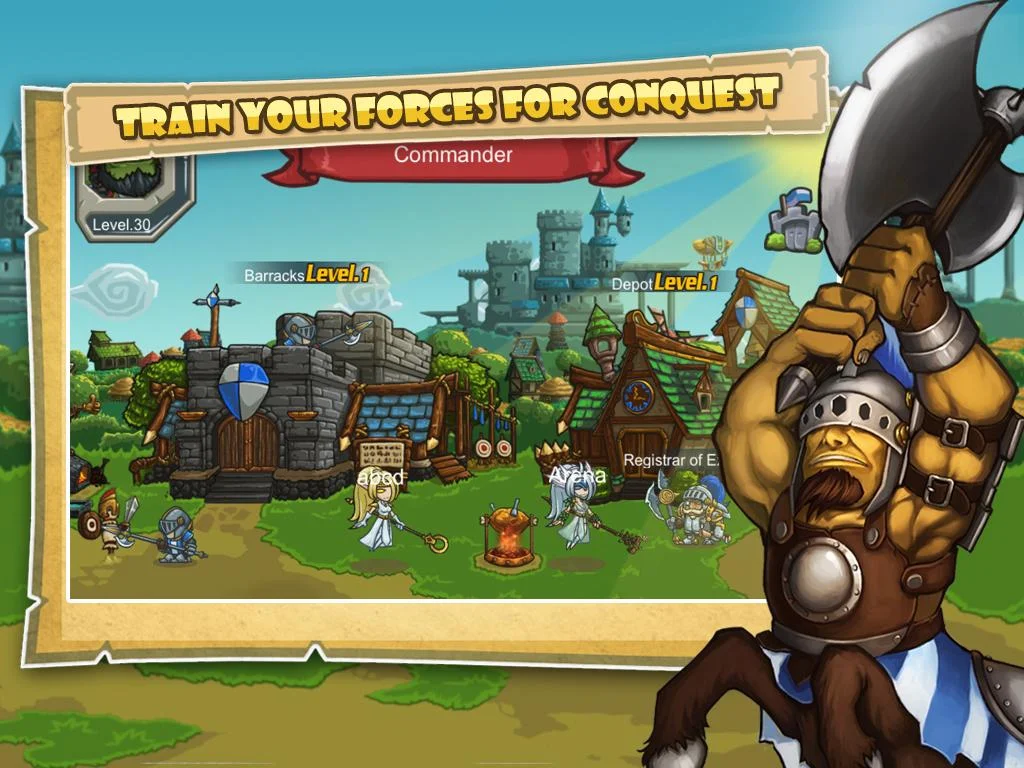
Game Action Kerajaan nih seru. dimana kita bisa memilih hero kita untuk perang defense antar musuh atau kerajaan. Pertama kita disuruh memilih Raja dari kerajaan kita, ingin tipe apa. ada Mage, Gladiator, warrior. hemm... dan ini game Online gan. dmna agan bisa membuat guild dan bertemu player dari mana saja. oke langsung saja cek it :
Details Game:
Name : Lord Of Legion
Genre : strategi
Platform : Android
Requires : Android 2.3.3 and up
Modification on Game:
- Mod Money
Review Modif:

Screenshoot:

Tutorial Instal :
1. Download game.
2. Pindahkan Game ke Androidmu.
3. Uniinstal Version originalnya, jika ada.
4. Instal MOD apk & Play
5. Enjoyyy
|DOWNLOAD|
Lord Of Legion -Infinite Wall/HP&VIP Unlocked[Android Game : Moded]
|Download Original game|
On Playstore
#Salam Blogger
#Semoga bermanfaat :)
#Ask? comment :)
Wednesday, February 17, 2016
Sunday, February 14, 2016
Hill Climb Racing Hack Generator Android No Survey No Password

Today our site freemasterhack.blogspot.ro release Hill Climb Racing hack Tool.We do hard work to make hack to one of the most popular game on Android&iOS.Our Hacks&Cheats and Applications are completly free from viruses.With our Hack you can add Unlimited Coins,Energy and more.Hill Climb Racing Hack Download Tool is avaliable for all Android & iOS devices.Dont wait and Download our Hack Tool and HAVE FUN!!
Meet Newton Bill, the young aspiring uphill racer. He is about to embark on a journey that takes him to where no ride has ever been before. With little respect to the laws of physics, Newton Bill will not rest until he has conquered the highest hills up on the moon! Face the challenges of unique hill climbing environments with many different cars. Gain bonuses from daring tricks and collect coins to upgrade your car and reach even higher distances. Watch out though – Bill’s stout neck is not what it used to be when he was a kid! And his good old gasoline crematorium will easily run out of fuel.In this Apk you will find that you have UNLIMITED MONEY

Friday, February 12, 2016
Layouts in Android
The way you construct the user interface in Android is pretty interesting. You can construct the UI widgets programmatically. But Android presents a decent way to construct the UI which is XML-based layouts.
The layout of an activity can be constructed by a XML file. These files are considered resources as they reside in res/layout folder. Each xml file consists of the declarations of widgets and their containers. The xml file is constructed in a hierarchical way, there is a tag that defines the layout of the widgets, inside this tag there are nested xml tags that define widgets, each widget tag has attributes that define the widget’s properties.
Let’s take a look at a simple layout xml file called main.xml which resides in res/layout directory:
This layout defines a textView and a button. We see that the root xml node is
We use the following code to construct the UI based on this xml definition
layout_width
which can have the values fill_parentwhich denotes the the width of the control should occupy all the available width, also it could have the value wrap_contentwhich denotes the control should occupy only width according to the width of its content which is the text inside the textView
The Button node has an extra attribute which is the android:id attribute, why this attribute is used in the button and not used in the TextView? The answer is that the TextView represents a label (just a static text to display) so there is no need to give it an id cause we will not reference it in the code, however if we need to display dynamic text in the TextView we can give it an id
To reference a control from the code we do it like this:
notice that the android:id attribute should be in the format of @+id/Control’sID as shown above, if you write it like android_id=”btnLaunch" the IDE would denote an error and you won’t be able to reference the control from the code.
Why to use XML-layouts and when to construct the layout programmatically ?
We have many layout forms:
Read More..
The layout of an activity can be constructed by a XML file. These files are considered resources as they reside in res/layout folder. Each xml file consists of the declarations of widgets and their containers. The xml file is constructed in a hierarchical way, there is a tag that defines the layout of the widgets, inside this tag there are nested xml tags that define widgets, each widget tag has attributes that define the widget’s properties.
Let’s take a look at a simple layout xml file called main.xml which resides in res/layout directory:
android_orientation="vertical"
android_layout_width="fill_parent"
android_layout_height="fill_parent"
>android_layout_width="fill_parent"
android_layout_height="wrap_content"
android_text="Linear Layout"
/>
<Button
android_layout_width="fill_parent"
android_layout_height="wrap_content"
android_text="this is a button 1"
/>
<Button
android_layout_width="fill_parent"
android_layout_height="wrap_content"
android_text="this is a button 2"
/>
This layout defines a textView and a button. We see that the root xml node is
node which defines the layout of all controls inside it.
We use the following code to construct the UI based on this xml definition
setContentView(R.layout.main);Also the TextView node contains attributes like
layout_width
which can have the values fill_parentwhich denotes the the width of the control should occupy all the available width, also it could have the value wrap_contentwhich denotes the control should occupy only width according to the width of its content which is the text inside the textView
The Button node has an extra attribute which is the android:id attribute, why this attribute is used in the button and not used in the TextView? The answer is that the TextView represents a label (just a static text to display) so there is no need to give it an id cause we will not reference it in the code, however if we need to display dynamic text in the TextView we can give it an id
To reference a control from the code we do it like this:
Button btnLaunch;
btnLaunch=(Button)findViewById(R.id.btnLaunch);
notice that the android:id attribute should be in the format of @+id/Control’sID as shown above, if you write it like android_id=”btnLaunch" the IDE would denote an error and you won’t be able to reference the control from the code.
Why to use XML-layouts and when to construct the layout programmatically ?
- Using xml layouts achieves separation between the interface and the application logic, instead of writing a bulk of code that constructs the UI, defining it as XML is easier and less confusing.
- You can save using code for constructing more complicated UI such as populating check-box columns in a grid.
- It is a trend to construct the UI with XML definitions like in Microsoft’s XAML or even HTML, so people who are familiar with technologies like these would find it easy to deal with Android.
We have many layout forms:
- Linear layout: manages controls in horizontal or vertical way.
- Table layout: manages the controls in a group of columns and rows.
- Relative layout: manages the controls relative to one another or to the parent.
- Absolute layout: manages the controls in absolute position by coordinates.
- Frame layout: manages the controls in a dynamic way.
- Scroll layout: manages the controls in a scrollable layout.

