Pages

Showing posts with label google. Show all posts

Sunday, March 16, 2014

Google 101 102 103 104 105 106 107

We started the Google+ project to help make online sharing more like real-world sharing. Of course, in life we increasingly share on the go, so over the past ~90 days we’ve developed Google+ apps for Android, iOS and the mobile web.

During this time weve made lots of improvements to the project, and in fact, the team just announced its 100th new feature overall (open signups). But our work is far from done, and today were bringing seven additional Google+ features to your mobile device.

Hangouts on your mobile (a.k.a. feature #92

Seeing someone face-to-face is one of the most important ways you can connect with them. Unfortunately were often too busy, too far away, or too unpredictable to make meetups a regular occurrence. Thats why were making Hangouts available on phones with Android 2.3+ and front-facing cameras (iOS support coming soon). Just find an active hangout in the Stream, and you can join your friends face-to-face-to-face:

Hangouts on your phone: Stream View (left), Green Room (center), Portrait View (right) 


101, 102, 103. You asked for it 

We take your feedback very seriously, and we do our best to deliver your most-requested features as quickly as possible. So today were launching three more things youve been asking for in Google+ mobile:


  • Improved SMS support. Users in the US and India can now post to Google+, receive notifications, and respond to group messages via SMS (with more countries on the way). To start texting, just verify your phone number in Google+ settings. 
  • Improved +mentions support. To add someone in your circles to a conversation (or simply get their attention), you can now +[their name] inside a post or comment. 
  • +1’ing comments. When you read a great comment in the Stream, you can now +1 it directly from your iOS device (with Android coming soon). 
    SMS (left), +mentions (center), +1’ing comments (right)

104, 105, 106. Giving you more choices 

The most important part of Google+ is you, so we want to make sure you have meaningful ways to personalize your experience -- from selecting just the right people to share with, to switching between the app, the web, and SMS as you see fit. Today were excited to bring three new options to mobile users:

  • Edit your profile photo. You can now put your best face forward, from where you happen to be. Just visit your profile, click edit, and you can choose or take a new picture. 
  • Customize your notifications. Some notifications may be more important than others, especially when you’re on the go. Now you can decide which ones you see (or not) on your phone. 
  • Make some room. If you’re taking lots of photos, or installing lots of apps, then internal storage can sometimes shrink. That’s why you can now move the Google+ app to SD storage on Android devices. 
 Edit your profile photo (left), Notification settings (center), Move to USB (right) 


107. So long Huddle, hello Messenger (and hi there, photos) 

As we move from limited field trial to open beta, we’re renaming Huddle to Messenger. More importantly, we’re adding new functionality to Messenger that makes group communication even more fun: photo sharing. So now when you’re sitting down for a meal, or kicking back on vacation, you can show your circles what’s happening, right this second:


Messenger: Homescreen (left), Choosing a Photo (center), Posting a Photo (right)  

We hope you enjoy today’s round of Google+ mobile features. There’s plenty left for us to do, so we’ll keep listening, and working to make your mobile experience that much better. In the meantime, you can try the new app (on Android and the mobile web today, and on iOS soon), and let us know what you think.

 Posted by Punit Soni, Google+ Mobile PM
Read More..

Saturday, March 15, 2014

“Download map area” added to Labs in Google Maps for Android

(Cross-posted on the Official Google Blog)

One way we bring you new product features is through Google Labs—a collection of fun, experimental features you can turn on if you’re interested in the functionality. In fact, Google Maps itself started as a lab. In addition to our desktop Maps Labs, Google Maps for Android has a few tricks you can try out right from your phone. We’d like to introduce you to one new experimental feature, “Download map area," but also remind you of two other ones we already have: “Scale bar” and “Measure.”

Download map area
When you’re visiting an unfamiliar location, Google Maps for mobile is great for getting an idea of how close you are to your destination, where streets and landmarks are in relation to each other, or just for getting “un-lost.” But what if you don’t have a data signal, or you’re abroad and don’t have a data plan? We say that if you use Google Maps for mobile, you’ll never need to carry a paper map again. The “Download map area” lab in Google Maps 5.7 for Android is a step in making that statement true even when you’re offline.

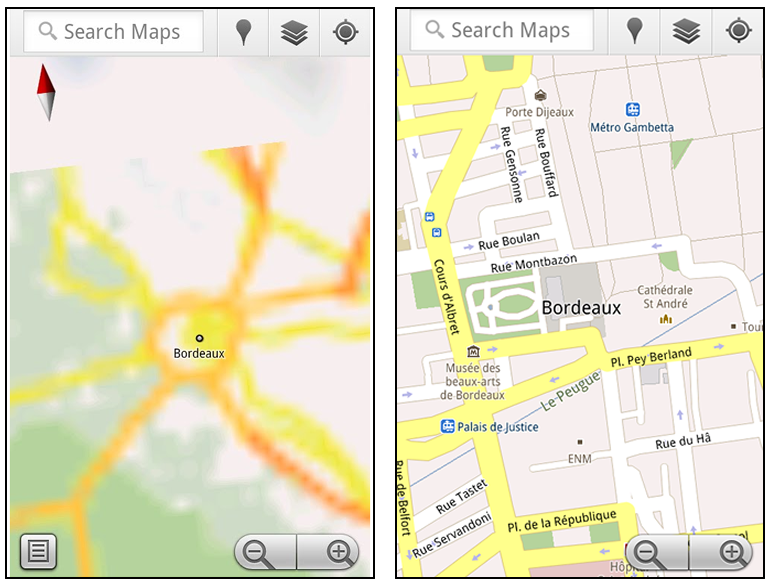
Let’s say later you’re visiting Bordeaux during a trip to France. If you were to open Google Maps for mobile and zoom into Bordeaux without data coverage or wifi, you’d see the image on the left:

Left: Bordeaux with no data or wifi. Right: Bordeaux with downloaded map area

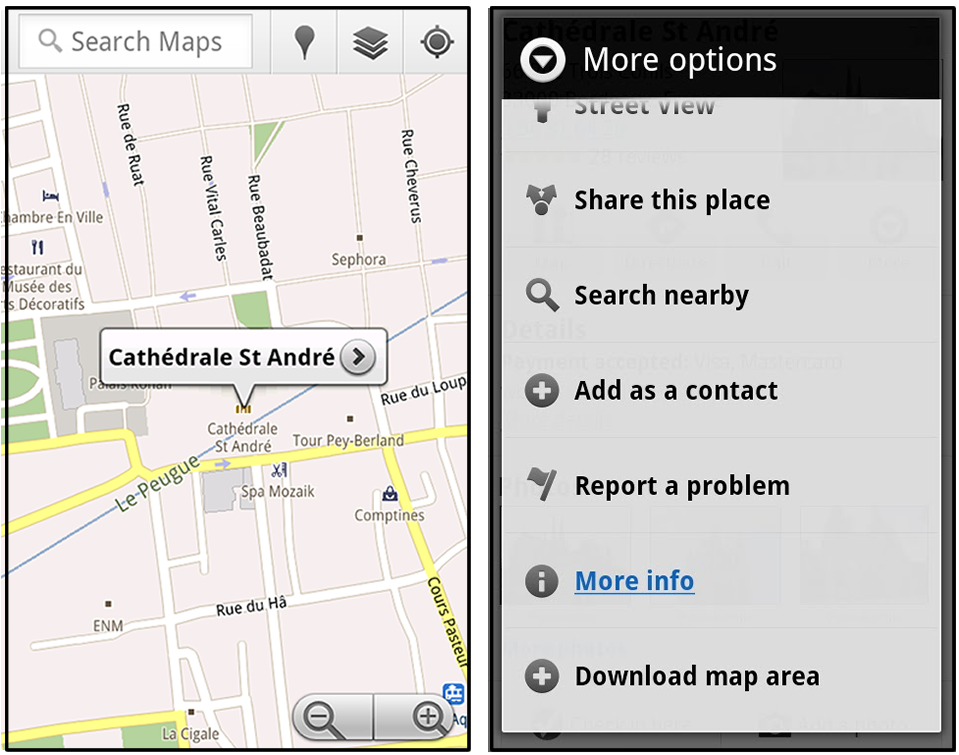
That’s not particularly useful when you’re trying to find out how close you are to the Cathedrale St. Andre. But a little advance planning and “Download map area” can help. Before you take your trip, while you still have access to WiFi or data coverage, you can open up any Places page in the world, click “More” to get the Place page menu, and download Google’s maps for a 10-mile radius.

Left: Tap a landmark to enter its Place page Right: Place page “more options” menu

The download can take as little as a minute or two. This download stores only the base map tiles and the landmarks on the map, so you still need a data connection to see satellite view and 3D buildings, search for Places and get directions. But we hope the level of detail available will help you find your way!

Left: Status screen for download. Right: Coverage of downloaded map area

All your downloaded map areas can be managed in your Google Maps cache settings so you can delete maps you no longer need or if you want to free up storage. After 30 days, all downloaded map areas will be removed from your cache; they can be re-downloaded any time.

Scale bar
Google Maps has approximately 20 different zoom levels that range from a 2,000 mile scale to a 20 foot scale. With finger gestures making it really quick and easy to zoom in and out, sometimes it’s not always clear what zoom level you’re at. What might be just a few streets away can be quite a long walk depending on the scale. To help with this, you can turn on a scale bar, which updates based on your zoom level.

Scale bar in the lower left

Measure
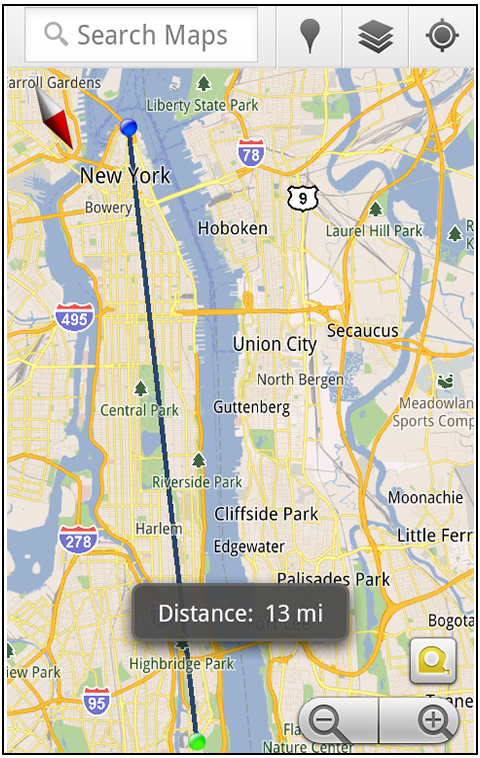
If you ever need to know the distance between San Francisco and New York (about 2602 miles) or between any other two points on the map, the “Measure” lab can help you out. Once it’s enabled, you’ll notice a tape measure icon just above the zoom buttons. After clicking that icon, you’ll be prompted to tap two points on the map and Google Maps will calculate the straight distance between those points (this direct distance is “as the crow flies”).

Example of the “Measure” Labs feature

To access Labs on your phone, press your phone’s menu button once in Google Maps, choose “More” and select Labs. On a tablet, click the menu button in the upper-right corner of Maps. The “Download map area” lab requires Android 2.1+ and the latest version of Google Maps. We look forward to bringing you more experimental features soon and hope you enjoy trying out Labs in Google Maps for Android.

Read More..

Friday, March 14, 2014

Integrating translation into Google Goggles

(cross-posted with Google Translate Blog)

Yesterday, at the Mobile World Congress in Barcelona, Eric Schmidt and I demonstrated a prototype version of Google Goggles that showcases the potential of integrating Googles machine translation and image recognition technologies. In the video below, youll see how we use Goggles to take a picture of a German menu and instantly translate the text into English:


You may wonder whats happening in the background. On the simplest level, this prototype connects the phones camera to an optical character recognition (OCR) engine, recognizes the image as text and then translates that text into English with Google Translate.

Right now this technology only works for German-to-English translations and its not yet ready for prime time. However, it shows a lot of promise for what the future might hold. Soon your phone will be able to translate signs, posters and other foreign text instantly into your language. Eventually, were hoping to build a version of Google Goggles that can translate between all of the 52 languages currently supported by Google Translate — bringing even more information to you on the go.

Read More..

Wednesday, March 12, 2014

Google App Engine helps MAG Interactive handle explosive growth of word game Ruzzle

Today we hear from Daniel Hasselberg, co-founder and chief executive officer of mobile game development company, MAG Interactive, based in Stockholm, Sweden. MAG Interactive produces some of the most popular games in the world, including Ruzzle, which has more than 45 million players in 142 different countries.


When we launched our word game Ruzzle in 2012, we had no idea it would become an international sensation almost overnight. We initially promoted the game only to our family and friends, but within two weeks of our launch, Ruzzle was the No.1 game on the Swedish App Store.


I believe if we hadn’t used Google App Engine to build the backend of Ruzzle, we wouldn’t have been able to scale fast enough with our own servers, which would have killed the app in the marketplace. There were about a million downloads of Ruzzle per month in the Nordic region, Holland, Spain and Italy through 2012. As we refined the game’s social integration through channels like Facebook and Twitter, we grew rapidly in Italy and the United States. In 2013, Ruzzle became the No. 1 game download on Google Play and the App Store in Italy, Sweden, the United States and many other countries.


Things were especially crazy at the end of last year. We were seeing about 700,000 new players each day from December 2012 through January 2013. We added 20 million users in a single month! It was incredible to see App Engine scale – and just keep on working – as we grew from about 5 million players to 25 million players in just a few weeks.


Our decision to use App Engine as the platform for Ruzzle and our new game, QuizCross, was strategic. Some of us at MAG Interactive helped develop the server platform for one of the most popular music download services in the Nordic region, so we knew about the challenges of having to scale quickly. While we didn’t anticipate Ruzzle’s popularity, we did recognize even before creating the game that we could face scaling problems if we were successful. So we decided from day one to use a cloud solution.


We looked at Amazon’s platform but preferred Google’s approach to cloud solutions. Google’s scalability was an important factor in our decision, but we also appreciated the company’s transparent pricing. The more efficient we became with App Engine, the less we paid.


The Google Cloud Platform team has been great to work with, as well. They are very supportive and appreciate our feedback. The technical support experts at Google are amazing, too – very hands-on. They know the platform extremely well and can help us work through any challenge.


We’re also using Google BigQuery for business intelligence. We track millions of events in the game every day so we know what users are doing – or not doing – and how we should improve the experience. We really like that we can throw enormous amounts of data at BigQuery, and it still performs. It only takes a few seconds to get results, and there are no scaling issues. It’s also easy to use. We have just one data analyst doing all the work with BigQuery but could probably use more people. If there are a few brilliant data mining experts out there who can imagine a future in Stockholm, please give us a call!


One thing we’ve learned from our BigQuery analysis is that the more users play Ruzzle, the more they improve their skills. New players typically find about 18 words in the two-minute time frame they’re given. After they play 100 games, they can find about 50 words, on average. I think that tracking player improvement is what keeps people playing and has helped to make Ruzzle so popular.


BigQuery offers our company a lot of insight into the use of our games and how we can improve them. We’re looking forward to expanding our relationship with Google as App Engine and Cloud Platform evolves.


-Contributed by Daniel Hasselberg, CEO, MAG Interactive
Read More..

Friday, March 7, 2014

Googles All Access music streamer hits Google Play in the UK today

Googles All Access music streamer hits Google Play in the UK today
Googles All Access music streaming app lands on the UK Google Play store today.
You may remember Google Play Music All Access from such launches as that time it launched at Google I/O back in May as a US-only music streaming service.
But it is available in Britain on Android from today, with a free month for all and an early bird deal to boot.
The streamer works in a similar way to Spotify - theres a vast library of songs from major labels and indies available to either stream online or cache to your Android phone or tablet so you can listen without an internet connection.
You can also sync your music library up to the service - as long as you dont have more than 20,000 songs to store online and then stream to your phones and tablets.

Stream team

Googles also pushing its interactive radio stations that...Read the rest of this post ---->
Read More..